

Gregory Macosko (Class of '65) created a VERY nice video "The Berea I Remember".
Greg, thank you for sharing your Berea memories with us!
I have updated our Supplemental Site, the "Berea Ohio Project"! Lots of old Berea pictures and among other things it includes obituaries from some of our GREAT teachers we were fortunate to have.
Confirmed by Mike Wrobel...............THIS Kevin Whelan was also part of the class of 1967, transferred from St Ed’s his Sophomore or Junior year. He lived in Berea by BW and Central School. His dad was a professor at BW. We think he graduated late in 67 or after summer school due to an administrative issue with his transfer and never walked with the class at graduation. 2 obituaries #1 (obit includes a picture), #2 Obituary Chambers Funeral Home
Berea-Midpark High School Virtual Tour, September 2020. Wow, very nice!
There has been alot of interest and discussion about the future of the Tree of Knowledge outdoor sculpture.
Here are some articles provided (in the link above) by Leslie Douglas, thank you Leslie.
It was great to see so many classmates at the 50th reunion. An e-mail list was collected at the Saturday night event. If you weren't able to attend that event and would like to be added to the list, please send me your information via this site. You can send a private message. I will add you to the list and forward the collected list. Thanks. Leslie Douglas
Ray Androne wrote a nice piece reflecting on............Life Happens! I made a new page on the top tabs for it. Nice job, Ray
This web site now has a “Class Connection Facebook Application”, so you will be able to access our web site through Facebook! Log onto the 1967 Class Web Site, then look under Member Functions (on your left) click “Class Connection”, Facebook opens, then click “Join Class” and Okay! To go to your regular Facebook page click on your name on the top tool bar, and to go to the class web site, click on Facebook “Home”, then under Apps, click “Class Connection”. Please let me know if you have any questions or comments. Thanks, Larry
We have a new feature called "Rewind", a 60 second audio of what happened on this date in history.
Tom Dameron (Class of '65) sent me some great "Swim Team" pictures. Thanks Tom! Click a picture to enlarge it.

Web sites:
Class of 1960 web site,
Class of 1965 web site,
Class of 1966 web site,
Class of 1971 web site and the supplemental site for Berea and Berea High School.
Thanks to those of you who have made a Paypal donation. It is very much appreciated.
I am sorry to let you know that Kerry James passed away April 12, 2013.
Compiled by Greg Macosko (Class of '65), great job!
Here are some great pictures from the Berea 2012 Community Guide, published by the City of Berea and the Chamber of Commerce.
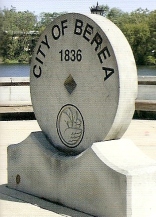
We have added a new feature, Misc Pix, which allows any Class of 1967 classmate to "upload" pictures after they log on to the web site. We hope many of you contribute pictures.
The new name for the school that is replacing Farirwood has been named "Grindstone Elementary School"...........update on Fairwood School.
Pictures from the Class of '65, '66, and '67 - July 2009 picnic!
Welcome to the Berea High Class Of 1967 web site. Please spend some time, create your information and let others know about the site, most of all have fun with it!
This site is very interactive. You'll be able to easily add information and photos yourself, contact other classmates, help find classmates, etc. I'm excited about the possibilities!
Don't forget about the Message Forum!
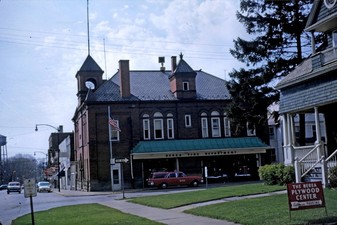
This picture more (on the Supplemental Site) are from Dick Curtner, Class of '65. Thanks Dick, these are GREAT photos!
We now have a Guest registration if you want to be a Guest in the '65 or '66 web site or if you know someone that would like to be a Guest in this site, let me know. Thanks, Larry Froehlich
To upload pictures: First I would select the photos you want to upload and save them on the computer desktop, this will make them easier to find. Make a note of a picture number if you have not saved it with a particular name.
· Log onto the system with your e-mail address and the password you selected;
· Click on Edit/Upload photos on the left side of the screen;
· Click Upload New Photo;
· Click Add Files;
· This will allow you to select the photo you will upload to your profile.
· Select desktop, if necessary, select the picture, click Open;
· This will send you back to your profile and click Upload Files, on the right side of the screen;
· You will see what your picture looks like, you can add a caption or upload another picture, after you are finished, click Save Files.
· Now click on Home Page and click your name in the Profile Updates!
Click to hear the Pride of Berea; the Berea High School Marching Band!
Here is the web site for the Berea High Band Boosters!!
NOTE:
If it’s your first time to the web site, please login by clicking the Classmate Profiles tab, scroll down to your name, click it and enter your current contact information. You can provide as little or as much information as you like without fear of spam. You can set your profile to display your contact information or to keep it private. It's up to you! This website is private and the information in it is not available in search engines, although the website's homepage is.
You can also share personal updates, memories, photos and videos with your classmates here. Enjoy looking at the profiles of old friends and don’t forget to add your own photos and comments. Check back often as classmates will continue to post new photos and updates.
Here is a link to the Berea Historical Society.
UPCOMING BIRTHDAYS

PROFILE UPDATES
| • | Sally Taylor (Dickson) 10/9 |
| • | Kristin Luedtke (Bates) 9/6 |
| • | Gene Berg 8/13 |
| • | James Wing 7/22 |
| • | Don Arcuri 6/15 |
| • | Carl Cooley (Cooley) 6/15 |
| • | Lana Hutchison (Grospitch) 3/10 |
| • | Jim Stepancik 12/28 |
| • | Ruth Otterson (Baggs) 8/7 |
| • | Brad Cookson 7/6 |
 |
WHERE WE LIVE
Who lives where - click links below to find out.
2 live in Alabama
1 lives in Alaska
5 live in Arizona
1 lives in Arkansas
6 live in California
1 lives in Colorado
15 live in Florida
8 live in Georgia
1 lives in Idaho
3 live in Illinois
3 live in Indiana
1 lives in Iowa
1 lives in Maryland
1 lives in Massachusetts
6 live in Michigan
1 lives in Mississippi
1 lives in Missouri
2 live in New Jersey
2 live in New Mexico
5 live in New York
6 live in North Carolina
129 live in Ohio
1 lives in Oklahoma
2 live in Oregon
4 live in Pennsylvania
1 lives in South Carolina
2 live in Tennessee
5 live in Texas
1 lives in Vermont
5 live in Virginia
1 lives in Washington
1 lives in Australia
1 lives in Germany
79 location unknown
68 are deceased